
YM GRAPHIX · FREE CREATIVE TOOLS
Your name. Your style. Your coloring page.
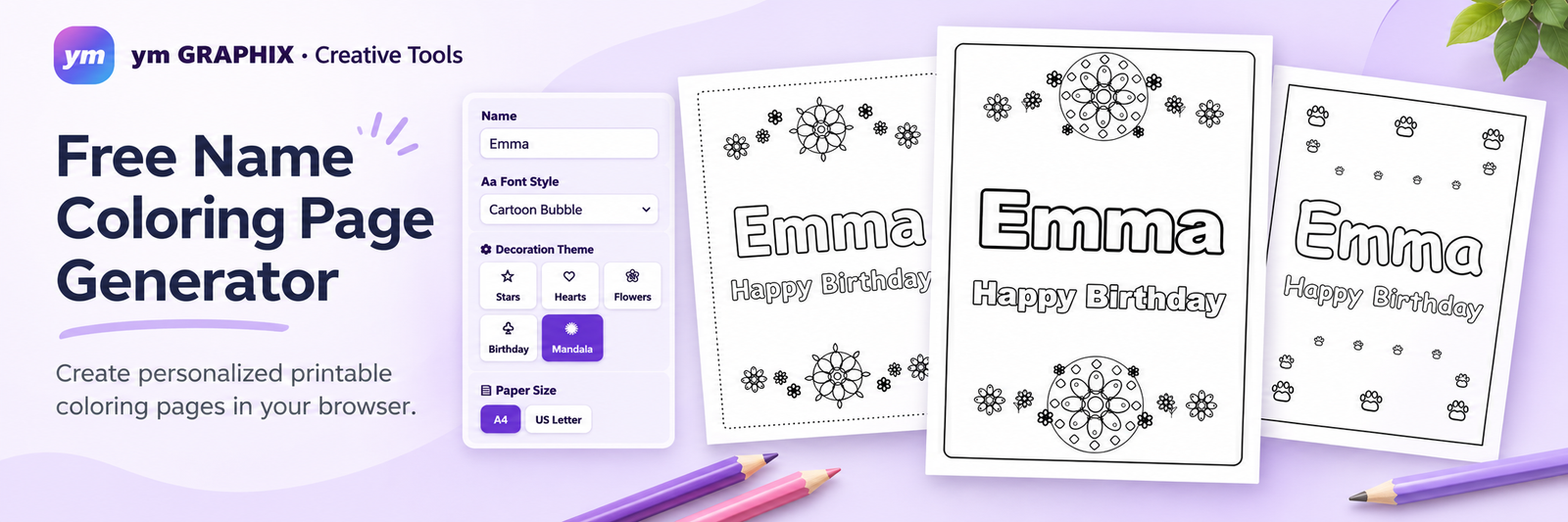
Create a personalized name coloring sheet in seconds. Choose a font, add creative decorations, and watch your printable page come to life — right in your browser.
✎ Custom outline letters
✿ Creative themes
▣ Print-ready A4 & Letter
Create your own personalized name coloring page online in seconds. Type a name, choose an outline font, add themed decorations, and preview a printable sheet before you download. Make pages for kids, birthday parties, classrooms, holidays, and relaxing adult coloring activities — no account or design software required.
Made something fun? Share the creativity! 💜
Help friends, parents, and teachers discover this free Name Coloring Page Generator. Pick your favorite way to share below!
01 · PERSONALIZE
Add your name
Type any name or message, and choose outline lettering that suits your style.
02 · DECORATE
Make it yours
Add stars, flowers, animals, birthday decorations, or keep it beautifully simple.
03 · PRINT
Color & enjoy
Preview your sheet and save it for A4 or US Letter printing.
How to Make Your Own Name Coloring Page
Our free Name Coloring Studio lets you build a custom coloring page from scratch while seeing every change instantly. Follow these steps to get a beautiful printable result:
- Enter your name or main message. Type anything from Emma to Happy Birthday, Leo! in the Name field. The studio preserves the capitalization and characters you enter, including accents and many non-English writing systems.
- Add an optional subtitle. A second line can say Happy Birthday, Merry Christmas, Best Mom Ever, or any short personal message. Leave it blank for a simple name coloring page.
- Choose an outline font. Try Playful Handwritten for a friendly look, Rounded Sans Outline for clean shapes, or an elegant serif style for a more mature design. The same font is applied automatically to the name and subtitle for a cohesive result.
- Adjust the sizes. Drag the sliders or tap the minus and plus buttons for precise two-point changes. Turn on Auto-fit to help long names stay within the printable area.
- Pick a decoration theme. Select Birthday, Flowers, Animals, Stars, Hearts, Christmas, or Mandala. Choose None for a text-only coloring page. Use Simple, Medium, or Detailed to adjust the amount of decoration.
- Set your paper and border. Choose A4 or US Letter, then switch the border on or off and select the frame style you prefer. Check the full page in the Live Preview panel.
- Download or print. Download an SVG for scalable artwork, export a PNG image, or click Print / Save as PDF and choose your browser’s Save as PDF destination.
Ideas for Kids, Holidays, and Adults
For kids: Print a child’s first name in large outline letters for early lettering practice, classroom name tags, or a fun weekend activity. Animal and star decorations pair nicely with playful fonts.
For special occasions: Make a personalized birthday sheet for a party table, a Christmas activity for family gatherings, or a floral page for Mother’s Day. Change the subtitle to match your celebration. The same editor also works for Easter, Valentine’s Day, graduations, and other occasions by changing the text and choosing complementary decorations.
For adults: Use a refined font with Mandala or Flowers, keep the composition simple, and print a relaxing lettering page. You can also make personalized gift inserts and creative activity pages for friends.
SAVE • SHARE • PRINT
Choose the right file for your project
PDF · Best for printing
Choose Print / Save as PDF in the studio, then select Save as PDF in your browser.
PNG · Best for sharing
Download an image for digital projects, inspiration boards and easy sharing.
SVG · Best for editing
Save scalable artwork. Fonts may vary on devices without matching typefaces.
Which Download Format Should You Choose?
PDF: Best for printing. Select Print / Save as PDF, confirm A4 or US Letter in the print dialog, and turn off browser headers and footers. Print at actual size when possible.
PNG: Useful for sharing a finished layout or inserting it into a digital project. Check the preview before saving.
SVG: Useful for resizable vector artwork and further editing. Please note that the text currently uses available browser or system fonts; opening SVG on another device may substitute a different font. For consistent printing across devices, the PDF you print from your own browser is the safer choice.
Frequently Asked Questions
Is the name coloring page generator free?
Yes. You can customize a page and use the available export options without creating an account.
Can I make a coloring page without decorations?
Yes. Choose None under Decoration Theme, then adjust the text and border to create a clean, minimalist layout.
Can I print on US Letter and A4 paper?
Yes. Both paper formats are supported. Be sure the browser’s print dialog matches the format you selected in the studio.
Does it support names in other languages?
The studio accepts Unicode text and has been tested with several writing systems, including Cyrillic, Japanese, and Chinese. The exact letter appearance depends on the fonts available in your browser and operating system; always inspect the preview and a saved file before printing a large batch.
Are my names sent to a server?
Coloring-page generation takes place in your browser. You do not need to upload a name or drawing to an AI service to use this tool.
Explore More Coloring Pages from ym GRAPHIX
Looking for ready-to-print illustrations too? Explore our Cute Easy Coloring Pages and Squishy Coloring Pages. Create a personalized name sheet here, then pair it with a coloring activity your family enjoys.